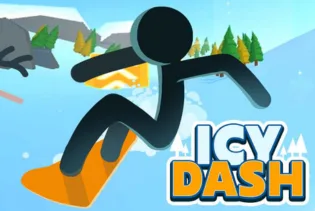
Icy Dash

Related Games





Icy Dash
- Arcade
- Icy Dash
Icy Dash is an interesting arcade game, which requires players to dash fast across the slippery frozen landscape, avoiding various obstacles, and remaining in control. The combination of rather simple mechanics with the increase in difficulty makes the gameplay easy to start, but hard to learn, thus providing players with many challenges that should be overcome. While dashing, players should control their characters' movements with the accuracy, as the slippery terrain will make it even more complicated for the player to stop, turn, and avoid any possible obstacle.
The main goal of the game is to dash as far as possible, but in order to achieve it, one should learn how to react to obstacles and control the character's movements. Each run becomes faster with each step and provides players with an extra motivation to continue the process of moving forward.
For those who like quick and fun browser games with simple controls, Icy Dash is perfect. Have some fun gaming experience with the Hide and Paint. You can try the game at any time, and it will provide you with lots of entertainment opportunities.
Gameplay
The game is quite intense already from its start. As soon as I begin to move along the icy pathway, I understand that controlling my character will require some special efforts. The slippery surface of the ice forces me to think and act in advance. Instead of making unexpected moves, it is better to be more concentrated and precise while performing the needed actions in order not to bump into the obstacles and keep on the right pathway.
With the development of the process, I have to react faster to each obstacle and make sure that I do not overdo in terms of the speed and direction of my moves. In some cases, I even realize that I am moving faster than usual, what makes an obstacle harder to overcome. It means that I can understand the reaction of my character better with every new run.
The thing that I like most about playing is that after each run, I feel compelled to show better results. You will also enjoy a game with adventurous gaming experience with the Curve Rush 2. Each successful passage through a particularly hard zone gives me satisfaction because of the effort and the necessary focus on the process. The mistakes may cost me my run, but there is always an opportunity to start over right away.
Features
How To Play
In order to play Icy Dash, the objective of the player would be to maneuver his/her character along the slippery icy path. Start playing cautiously and notice how the character is sliding over the icy ground. Since the ice is slippery, rapid movements will not allow you to slow down or to move in a certain direction, thus be careful and predict the upcoming obstacles. Focus on the way and be ready to react to obstacles that come in your way. Maneuver the character using the controls to move him/her safely and prevent any obstacles on the way. The further the game goes, the higher the level of difficulty will become since you will need to act even faster and move accurately. You should also try one more game to experiment your action skills into the Dashmetry game. Try to keep the steady speed and avoid any extra movements that can throw you away from your path. In case of an error, start over again and analyze the situation to perform better next time.
Game Controls
Desktop Browser Controls
Mobile Browser Controls
Recommended platform
The best experience playing Icy Dash would be through a desktop browser because the keyboard gives you more accuracy when moving around. Also, you can see the obstacles from afar due to the large screen. Mobile browsers give you convenience, but the lack of accuracy prevents you from making tough runs.
More Game Like This
If you are a fan of the fast-paced and easy-to-learn game play of Icy Dash, then here are some other browser games that you may want to try. In Crossy Road, you need to maneuver your way through roads, rivers, and railroads while avoiding deadly obstacles to go as far as you can. In Tiny Fishing, on the other hand, you can cast your fishing rod and catch various kinds of fish, improving your equipment as you progress towards deeper areas for greater rewards. And for those who want an action-packed game that requires strategy and accuracy, there is Noob Archer, wherein you need to kill off the enemy using a bow and arrow with perfect shots. These games have a variety of gaming styles, but all three are easy to understand and offer good challenges.
FAQ
Q1. What is Icy Dash?
Ans: Icy Dash is a very quick game in which you control the movement of the player over frozen paths, while trying to overcome different obstacles. This game checks your reflexes and reaction.
Q2. How do I control my character in Icy Dash?
Ans: If you are using desktop version of the game, then you have to use keyboard controls for moving and controlling your character in Icy Dash. If you are using mobile version, then touch controls.
Q3. Is Icy Dash difficult to play?
Ans: The game of Icy Dash is simple but not easy at the same time, because of slippery movements in the game, so that practicing will give you better scores.
Recommended Categories










.webp)
Comments (0)